Beckhoff ADS Reader
Description
Beckhoff ADS Reader is used for reading variable values from Beckhoff TwinCAT using ADS protocol.
note
For using Beckhoff ADS channels you need to put the AdsToJava-3.dll in a folder and start the Orchestra applications with this argument -Djava.library.path=<Path to the DLL folder> .
Creation
To create a Beckhoff ADS Reader, follow the steps described in the general description of Scenario Elements.
Configuration
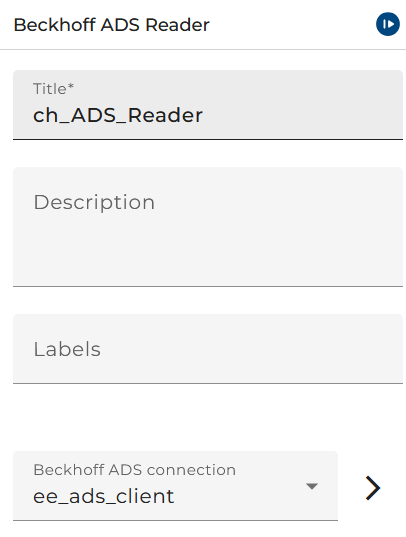
The dialog to configure the Beckhoff ADS Reader looks like:
 |
|---|
| Base view of the Beckhoff ADS Listener |
Beckhoff ADS Connection is the only property you need to configure the Beckhoff ADS Reader.
Input Message
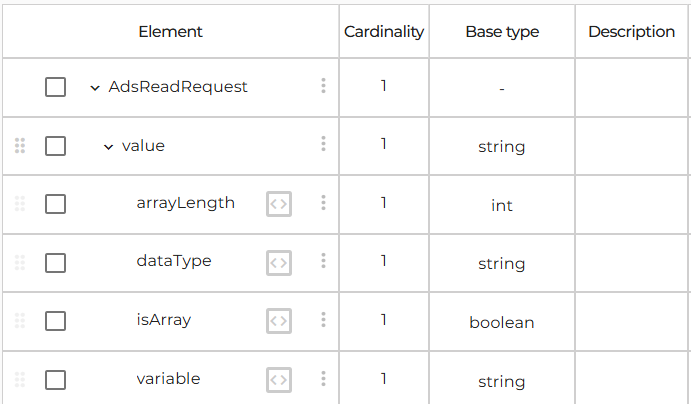
The channel expects following message type to read a value from a variable in TwinCAT.
 |
|---|
| Message type for Beckhoff ADS Reader |
- variable:
<class name>.<variable name>as attribute of the value - dataType: data type of the variable as attribute of the value. As data type name, all type names found in the TwinCAT can be used here.
- isArray is an optional attribute. Has to be
trueif the user wants to read a value of an array variable. - arrayLength is the length of the array. Is only needed if isArray is true.
- stringLength is the length of the string defined in TwinCAT. Is only needed if isArray is true and dataType is STRING.
Example
<?xml version="1.0" encoding="ISO-8859-1" standalone="no"?>
<AdsReadRequest>
	<value variable="MAIN.stringVar" dataType="STRING"/>
</AdsReadRequest>
Example for reading array value
<?xml version="1.0" encoding="UTF-8"?>
<AdsReadRequest>
	<value variable="MAIN.myStringArray" dataType="STRING"
		isArray="true" arrayLength="5" stringLength="20" />
</AdsReadRequest>
Output Message
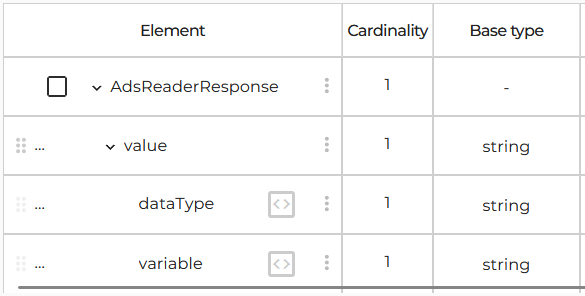
The response message type of the Beckhoff ADS Reader looks like:
 |
|---|
| Output message type for Beckhoff ADS Reader |
- value response value from TwinCAT
- variable:
<class name>.<variable name>as attribute of the value - dataType: data type of the variable as attribute of the value
Example
<?xml version="1.0" encoding="UTF-8"?>
<AdsReaderResponse>
	<value variable="MAIN.stringVar" dataType="STRING">Hello World</value>
</AdsReaderResponse>